


AirDroid Parental Connector
3.48.00 Reviews
App Specs
- Version
- 1.1.2.2
- Updated On
- License
- Free
- Downloads
- 100,000+
- Developer
- SAND STUDIO
- Categories
- Parenting
- Platform
- Android
Screenshots

 Analysis by AppCompare
Reading a parental-control dashboard should not feel like solving a puzzle, especially when a parent is checking it between work, errands, or school pickup. That is the lens I would use for AirDroid Parental Connector: does it make important information easy to find, and can a family use its controls without turning every check-in into a technical project? Its stated focus is connecting devices for oversight, so the value is less about novelty and more about whether the tools fit calmly into family routines.
Readability and navigation in a busy day
The app is a parenting tool from SAND STUDIO, and its appeal is straightforward: bring screen-time oversight, location checking, and website filtering into a cross-platform setup. A simple layout can help a parent who is not comfortable with technical menus, but clarity also depends on how the family uses the app. I would start with one practical question—what do we need to check most often?—and make that the reason to open the dashboard, rather than treating monitoring as a running background task.
For a household, predictable navigation matters more than a screen full of controls. If one caregiver handles school pickup and another sets device boundaries, agree on what each person is responsible for before linking a child’s device. That small conversation can prevent duplicated checks and mixed messages. It also gives a child a clearer explanation of why location or screen-time settings are being used, instead of making the app feel like a secret observation tool.
The connector framing is worth keeping in mind: this is part of a cross-device parental-control arrangement, not a substitute for family discussion. Before relying on it, I would check that the parent and child devices can be paired as intended and that each person understands which controls are active. If a setup step is confusing, pause and resolve it together rather than changing settings in a hurry. That is especially useful when the phone is needed immediately for a journey or school communication.
Motor and sensory considerations
Any app used while a parent is walking, carrying bags, or supervising a child should be checked in a calm moment first. I would explore the dashboard at home, learn where the main controls sit, and avoid trying to adjust limits while distracted. This is a practical accessibility habit, not a claim that the app has a particular accessibility certification or a specific set of assistive features.
Parents and children also have different comfort levels with alerts and location checks. Frequent notifications can be hard to manage for someone who is sensitive to interruptions, while small text or a busy screen can make quick reading more tiring. I would review notification settings on the devices involved and keep only the alerts the family genuinely needs. For a child who finds monitoring stressful, explain the purpose and agree on a routine for discussing concerns; a control is more useful when it does not undermine trust.
Situational access and family routines
A realistic use case is a child walking home from an after-school activity while a parent is still at work. A location check may help the parent know whether to expect them soon, while screen-time settings can support a boundary agreed on for homework or bedtime. The app should serve those specific moments, not encourage constant checking. A useful habit is to decide in advance when a location check is appropriate—for example, if a planned arrival is delayed—so the tool supports independence instead of replacing it.
Worth Reading Before You Choose

EA SPORTS FC Mobile 26 Is a Bigger Football Game, but It Takes Time

Flipboard Shows What News Apps Must Do Beyond the Feed

Switching to Android Auto Means Rethinking Your Driving Routine

Google Calendar Makes a Crowded Week Easier to Manage

Ludo King Makes the Most of the Minutes Between Plans

Baby Panda World Brings Quick Play to Modern Phones, but Its Game Library Feels Busy
Website filtering and screen-time controls can also be easier to discuss when they are tied to a clear household rule. Rather than presenting a restriction as a surprise, I would explain what it is meant to protect or make easier, then revisit it if schoolwork, accessibility needs, or family schedules change. A child may need a device for an assignment or a communication aid, so a broad limit can have unintended effects. Check the child’s actual routine before setting boundaries, and leave room for exceptions that the family has discussed.
Remaining barriers and who may prefer another approach
Parental controls cannot tell a family everything that matters. A location reading does not explain why a child has stopped moving, and a time report cannot show whether a particular app was being used for homework, creativity, or relaxation. Those details still call for a conversation. I would not recommend relying on monitoring alone when the main concern is a child’s wellbeing or online relationships; direct support and age-appropriate guidance are more important than adding another check.
This kind of connector may be less suitable for a family that wants a child to manage their own device with minimal supervision, or for caregivers who are unwilling to agree on shared rules. It may also be the wrong fit if the family needs a very specific accessibility accommodation that it has not confirmed will work with the setup. In those situations, built-in device controls or a simpler family agreement may be a better starting point. The key trade-off is convenience versus the time and trust required to configure monitoring thoughtfully.
Compared with using a phone’s built-in parental controls, a cross-platform connector can be attractive when adults and children do not all use the same kind of device. Built-in controls may be preferable when a family wants fewer apps to manage or only needs basic limits on one platform. I would compare the actual devices in the household before choosing: cross-platform support is useful only if it covers the family’s combination and the controls are understandable to everyone who needs them.
AirDroid Parental Connector is free, is rated for Everyone, and is available for devices running Android 8.0 or later. It was released on February 27, 2025, and version 1.1.2.2 is the current version. Its average rating is 3.7 from around 240 ratings, with 100,000+ installs and five written reviews. Those figures suggest that it has found an audience, but I would treat them as context rather than proof that it will suit a particular family. The best test is whether the setup works across your devices and whether the resulting routine feels fair to both parent and child.
Before settling on it, I would ask: can every caregiver who needs access use the same arrangement, are the location and time controls clear enough to explain, and can the family handle exceptions without confusion? Those practical questions matter more than a long feature checklist. If a child shares a device, has changing schedules, or relies on particular apps for school or communication, test the household rules against those needs before applying them broadly.
Getting Started with AirDroid Parental Connector
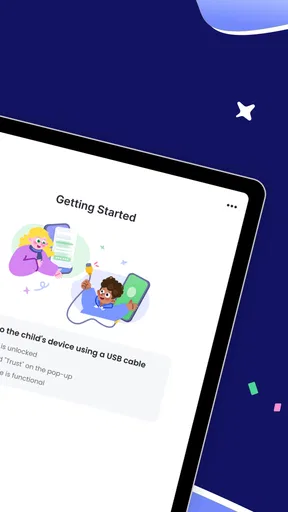
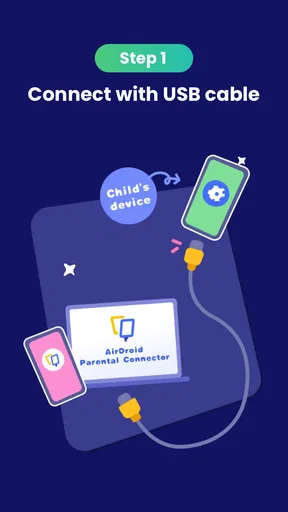
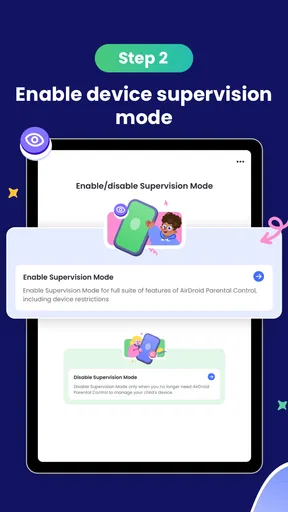
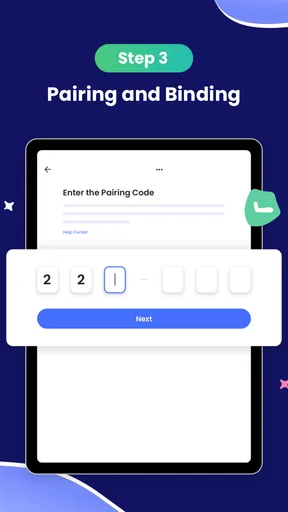
Setting up AirDroid Parental Connector was surprisingly easy. After downloading it from the Play Store, the installation process was straightforward, with clear instructions guiding me every step of the way. Once installed, the app prompted me to link it to my child's device. A quick scan of a QR code, and we were in business.
The user interface is clean and intuitive. I didn’t feel overwhelmed by options, which is a big plus when you’re juggling responsibilities and just need something that works without a hassle. The dashboard gives a neat overview of everything that’s happening on the connected device, from app usage to screen time.
Features That Stand Out
Let’s talk features, because this is where AirDroid Parental Connector really shines. The app offers real-time location tracking, which is a lifesaver when your kid decides to "forget" to text you back. Seeing their location on a map in real-time gave me peace of mind like no other.
Another feature I loved was the app usage report. The app keeps tabs on which applications are being used and for how long, allowing me to have informed conversations with my child about their digital habits. It was eye-opening to see just how much time they spent on certain apps.
There’s also a screen time management tool that lets you set limits on device usage. I could easily block apps during homework time or bedtime, ensuring my child wasn’t up all night scrolling through social media.
Safety and Privacy
In today’s world, privacy is everything, and I’m happy to report that AirDroid Parental Connector takes this seriously. All data is encrypted, and the app does a good job of maintaining a balance between monitoring and respecting your child’s privacy. You’re not going to be snooping on messages; it’s more about ensuring overall safety.
One feature I found particularly thoughtful was the alert system. If your child tries to download an app that might not be appropriate, you get a notification. This allows for timely interventions and discussions about online safety.
Performance and Reliability
I tested the app over a few days, and it performed consistently without any hiccups. The location tracking was accurate, and the app usage data refreshed promptly. It’s clear that the developers have put a lot of thought into ensuring this app runs smoothly. I never experienced any crashes, and the app didn’t drain the battery excessively, which is always a concern with tracking apps.
While using the app, I didn’t notice any lag or slowdowns on my child’s device either, which was a pleasant surprise. It seems to run efficiently in the background without hogging resources.
Final Thoughts
In a world where digital safety is paramount, AirDroid Parental Connector provides a reliable and effective tool for parents. It’s not about spying, but about keeping your child safe and fostering healthy digital habits. With its easy setup, comprehensive features, and focus on privacy, this app is a solid choice for any parent looking to stay connected with their child's digital life.
If you’re a parent like me, who sometimes feels a bit out of their depth in the digital age, this app offers a helping hand. It’s like having an extra set of eyes, ensuring that your child’s online experiences are safe and enriching.
My strongest recommendation is to treat its controls as prompts for better conversations, not as a verdict on a child’s choices. A report can point out a pattern worth asking about, but it cannot supply the context behind it. Likewise, a location check is most useful when it answers a specific concern, such as whether a child has reached an agreed destination, rather than becoming a habit repeated every few minutes.
For a parent deciding whether to try it, I would begin with the one or two needs that are hardest to manage in the household, then see whether the connected setup makes those needs easier. If the main goal is a shared understanding of device routines, the usage and time-management tools may be a sensible place to start. If the family primarily wants a quick way to coordinate arrivals, location tracking may be the more relevant part. Keeping the first trial narrow makes it easier to notice what genuinely helps and what creates extra friction.
My overall view is that this is most promising for caregivers who want practical oversight across devices and are prepared to explain the boundaries openly. It is not a replacement for trust, a conversation about online choices, or a child’s own growing independence. Used selectively, it can help a parent stay informed without making every screen interaction a source of conflict. If those limits fit your family, it is worth considering; if they do not, a lighter-touch approach may be the kinder and more workable choice.
Pros
- Easy setup and user-friendly interface.
- Real-time location tracking feature.
- Remote monitoring for multiple devices.
- Comprehensive app usage reports.
- Cross-platform compatibility.
Cons
- Limited free version features.
- May impact device battery life.
- Requires stable internet connection.
- Privacy concerns with data handling.
- Notifications can be overwhelming.
FAQs for AirDroid Parental Connector
What is AirDroid Parental Connector and how does it work?
AirDroid Parental Connector is an application designed to help parents monitor and manage their children's smartphone activities. It works by allowing parents to connect their device to their child’s device, providing insights into app usage, screen time, and location tracking. The app ensures parents can keep an eye on their child’s digital habits in real-time.
Is AirDroid Parental Connector compatible with both Android and iOS devices?
Yes, AirDroid Parental Connector is available for both Android and iOS devices. This cross-platform compatibility means parents can monitor and manage their child’s activities regardless of the device they use. However, it’s essential to check the system requirements to ensure compatibility with specific device models and versions.
What features does AirDroid Parental Connector offer?
AirDroid Parental Connector offers a variety of features including app usage tracking, screen time management, location tracking, and web filtering. It also provides real-time alerts for suspicious activities, allowing parents to respond quickly to potential issues. These features help in maintaining a balanced and safe digital environment for children.
Is my child’s data safe when using AirDroid Parental Connector?
AirDroid Parental Connector places a strong emphasis on data security. The app uses encryption to protect data and ensures that only authenticated users can access the information. Parents are encouraged to review the app’s privacy policy to understand how data is handled and what measures are in place to safeguard personal information.
Does AirDroid Parental Connector require a subscription?
While AirDroid Parental Connector offers a free version with basic features, accessing premium features may require a subscription. The premium version provides enhanced functionalities such as advanced monitoring options and detailed reports. Users should evaluate their needs to decide whether the free or paid version is more suitable.


